If you work in IT, cybersecurity, cloud computing, DevOps, or IT service management, you have probably seen the acronym CMDB. But what does it actually mean, and why do IT teams care so much about it?
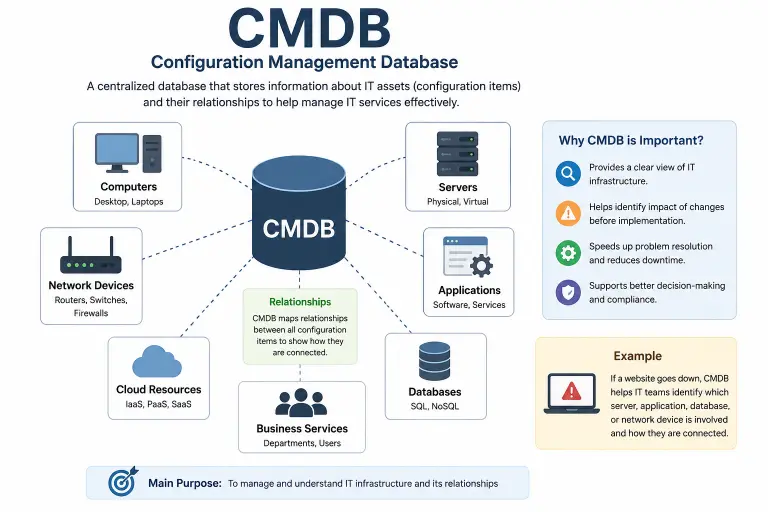
CMDB meaning is Configuration Management Database. In simple terms, a CMDB is a structured place where an organization keeps information about important technology components and, crucially, the relationships between them. These components can include servers, applications, databases, networks, virtual machines, services, and other configuration items.
Think of a CMDB as a detailed map of an organization’s IT environment. Instead of simply knowing that a company has 500 servers, the team can understand which applications run on which servers, which services depend on those applications, and what could be affected when something changes.
That relationship information is what makes a CMDB especially useful.
In this guide, we’ll explain the CMDB full form, what a CMDB does, how configuration items work, real-world examples, CMDB benefits, its relationship with ITSM and ITIL, and how it differs from ordinary asset management.
What Does CMDB Mean?
CMDB stands for Configuration Management Database.
A CMDB is a repository designed to store configuration information about an organization’s IT environment. It doesn’t simply list technology assets. A useful CMDB also records attributes and relationships between configuration items so teams can understand how different parts of an environment work together.
Quick Answer
CMDB means Configuration Management Database. It stores information about configuration items and their relationships, helping IT teams understand infrastructure, investigate incidents, evaluate changes, and manage services.
The key phrase here is relationships.
For example, knowing that a company owns a database is useful. Knowing that the database supports a particular application, which supports a customer-facing service, is much more useful when an outage or planned change occurs.
What Does the CMDB Acronym Stand For?
| Letter | Meaning |
|---|---|
| C | Configuration |
| M | Management |
| D | Database |
| CMDB | Configuration Management Database |
What Is a Configuration Item?
A major part of understanding CMDB meaning is understanding the term configuration item, commonly shortened to CI.
A configuration item is a component that an organization chooses to manage as part of its service or technology environment.
Depending on the organization’s needs, CIs can include:
- Servers
- Applications
- Databases
- Network devices
- Virtual machines
- Containers
- Operating systems
- Business services
- Cloud resources
- Software
- Facilities
- Other relevant entities
ServiceNow describes a CI as an IT component tracked in the CMDB, while Atlassian notes that CIs can include hardware, software, systems, facilities, and even personnel depending on the organization’s model.
Example of a Configuration Item
Imagine an online shopping company.
Its CMDB might contain:
- Web application
- Application server
- Database server
- Payment service
- Load balancer
- Network components
- Cloud resources
The real value comes from connecting those items.
For example:
Customer website → Web application → Application server → Database
If the database goes down, the relationship map can help the IT team understand which services could be affected.
How Does a CMDB Work?
A CMDB works by collecting, organizing, and maintaining information about configuration items and their relationships.
Data can enter a CMDB through different methods, including manual entry, integrations, and automated discovery tools. Atlassian identifies manual input, integrations, and discovery tools as common ways to populate configuration data.
A simplified CMDB workflow looks like this:
Discover → Record → Relate → Monitor → Update → Analyze
1. Discover Configuration Items
The organization identifies the technology and services it needs to manage.
For example, discovery processes may identify servers, applications, network devices, or cloud resources.
2. Record Configuration Data
Information about each CI is stored.
This might include:
- Name
- Type
- Owner
- Location
- Version
- Status
- IP address
- Operating system
- Business importance
The exact attributes depend on the organization’s CMDB model.
3. Map Relationships
The system records how configuration items connect.
For example:
Application A → runs on → Server B
or:
Service X → depends on → Database Y
These relationships help teams understand dependencies.
4. Keep Information Updated
IT environments change constantly.
Servers are replaced. Applications are upgraded. Cloud resources are created and removed. Networks evolve.
A CMDB therefore needs processes and integrations that keep its information accurate.
5. Use the Data
Once the information is reliable, IT teams can use it for:
- Incident management
- Change management
- Impact analysis
- Troubleshooting
- Risk assessment
- Service management
- Compliance activities
Why Is a CMDB Important?
A modern IT environment can become complicated very quickly.
One application might depend on multiple servers. Those servers may depend on databases, networks, cloud services, authentication systems, and other components.
Without a clear picture, changing one component can feel like pulling a random wire out of a giant machine and hoping nothing breaks.
A CMDB helps provide that picture.
Atlassian explains that CMDB data can support impact analysis, root-cause analysis, incident management, change management, and compliance.
Better Visibility
A CMDB gives teams a more connected view of their IT environment.
Instead of looking at isolated asset records, teams can examine relationships and dependencies.
Faster Troubleshooting
When an application fails, technicians can use configuration and relationship information to investigate possible causes and affected services.
Better Change Planning
Before making a change, teams can identify which systems or services may be affected.
Improved Risk Awareness
Understanding dependencies can help teams recognize potential risks before implementing changes.
CMDB in ITSM
ITSM stands for IT Service Management.
ITSM focuses on designing, delivering, supporting, and managing IT services so they meet organizational and user needs.
A CMDB can provide configuration information that supports several ITSM processes.
For example, an incident-management team can use CI relationships to understand what may be affected by an outage.
A change-management team can use dependency information to assess potential impact before approving a change.
IBM describes CMDBs as an important part of ITIL-oriented service management because they track components, attributes, relationships, and changes associated with IT services.
CMDB and Incident Management
Suppose an employee reports that an important application is unavailable.
The IT team needs to determine:
- What application is affected?
- Which server supports it?
- Which database does it use?
- Which network components are involved?
- Which business services depend on it?
A well-maintained CMDB can provide this context.
CMDB and Change Management
Imagine an administrator wants to upgrade a database.
Before making the change, the team can examine the relationships associated with that database.
If several important applications depend on it, the change may require additional planning, testing, communication, or scheduling.
That’s one reason configuration relationships matter so much.
CMDB and ITIL
ITIL is a widely used framework for IT service management.
CMDB concepts have long been associated with configuration management within IT service management practices.
IBM describes the CMDB as an important ITIL component for understanding services, software, hardware, users, documents, and their relationships.
The important point is that a CMDB is not simply a database full of random IT records.
Its value comes from organizing configuration information in a way that supports service-management decisions.
CMDB vs. Asset Management
A common question is:
Is a CMDB the same thing as IT asset management?
No.
They are closely related, but they serve different purposes.
IT asset management (ITAM) focuses on managing valuable assets throughout their lifecycle.
Configuration management focuses more heavily on understanding configuration, dependencies, and relationships needed to manage services effectively.
Atlassian explains that configuration management and IT asset management are separate disciplines, even though they overlap.
Simple Comparison
| CMDB | IT Asset Management |
|---|---|
| Focuses on configuration and relationships | Focuses on asset lifecycle |
| Tracks configuration items | Tracks valuable assets |
| Helps understand dependencies | Helps manage ownership and lifecycle |
| Supports impact analysis | Supports purchasing, maintenance, and disposal |
| Strongly connected to service management | Strongly connected to asset management |
Simple Example
Imagine a company laptop.
Asset management might track:
- Purchase date
- Cost
- Warranty
- Owner
- Disposal date
A CMDB may track the laptop as a CI if it is relevant to the organization’s configuration and service-management needs, including relationships or technical attributes.
Not every asset necessarily needs to become a CMDB CI. The right scope depends on the organization’s goals and use cases.
Common CMDB Examples
Let’s make the concept practical.
Example 1: E-Commerce Website
A company operates an online store.
Its CMDB might contain:
- Web application
- Application servers
- Database
- Payment service
- Load balancer
- Cloud infrastructure
The CMDB records how these components relate.
If the database fails, the team can identify services that depend on it.
Example 2: Banking Application
A bank may have a customer-facing application connected to authentication systems, databases, APIs, and infrastructure.
A CMDB can represent these dependencies.
This can help teams understand the potential impact of infrastructure changes.
Example 3: Corporate Network
A company might track:
- Routers
- Switches
- Firewalls
- Servers
- Applications
- Network connections
Relationship information can help technicians understand which systems may be affected when a network component experiences a problem.
What Information Does a CMDB Store?
The information stored depends on the organization’s model, but CMDB records can include attributes such as:
- CI name
- CI type
- Owner
- Status
- Location
- Version
- Technical details
- Dependencies
- Relationships
- Change history
- Business importance
The goal isn’t necessarily to collect every possible piece of information.
A useful CMDB should contain information that supports meaningful business and IT processes.
Why Data Quality Matters
A CMDB filled with outdated or duplicate information isn’t very helpful.
Imagine a technician sees an old server listed as active even though it was retired months ago.
That inaccurate information could lead to poor decisions.
For this reason, CMDB programs often focus on data quality, including completeness, correctness, and freshness.
ServiceNow’s current CMDB guidance includes data-quality concepts such as stale records, missing attributes, and duplicate records.
Benefits of a CMDB
A well-designed and well-maintained CMDB can provide several benefits.
1. Better IT Visibility
Teams gain a clearer understanding of the technology environment.
2. Improved Impact Analysis
Relationships can help teams identify what may be affected by an incident or change.
3. Faster Troubleshooting
Technicians can investigate systems using configuration and dependency information.
4. Better Change Management
Teams can make more informed decisions before changing infrastructure.
5. Improved Risk Management
Understanding dependencies can reveal potential points of failure.
6. Better Service Management
Configuration data can provide context for IT services and business processes.
7. Improved Compliance Support
Configuration and historical information can support audits and compliance activities when properly maintained.
Common CMDB Challenges
A CMDB can be powerful, but implementing one isn’t as simple as buying software and pressing “Start.”
Keeping Data Accurate
IT environments change constantly.
If data isn’t updated, the CMDB can quickly become unreliable.
Defining the Right Scope
Trying to put every piece of information into a CMDB can create unnecessary complexity.
Atlassian recommends defining CMDB scope around relevant use cases rather than trying to force every possible data set into the database.
Avoiding Duplicate Records
Multiple systems may provide information about the same CI.
Without good data-management practices, this can create duplicates or conflicting information.
Getting Teams to Participate
CMDB success isn’t purely a technical problem.
People and processes matter too.
Teams need clear ownership, agreed standards, and processes for maintaining configuration information.
CMDB Data Sources
Organizations can populate CMDBs through different sources.
Manual Entry
Technicians can manually create or update records.
This can be useful for information that isn’t easily discovered automatically, but manual processes can become difficult to scale.
Automated Discovery
Discovery tools can identify devices and technical information automatically.
This reduces some manual work and can help organizations detect changes.
Integrations
A CMDB can receive information from other systems through integrations.
For example, an organization may connect its CMDB with:
- Monitoring tools
- Cloud platforms
- Asset-management systems
- Discovery tools
- Endpoint-management platforms
- Service-management systems
ServiceNow documents integrations and discovery mechanisms as ways to populate and maintain CMDB information.
Is a CMDB a Single Source of Truth?
You may hear people call a CMDB a single source of truth.
The phrase can be useful, but it needs context.
A CMDB can provide a trusted view of configuration information for specific use cases. However, that doesn’t necessarily mean every piece of enterprise information must physically live inside the CMDB.
For example, financial information may belong in a financial-management system, while software-license information may belong in a software asset-management system.
Relevant information can sometimes be integrated or federated so teams can view the context they need without duplicating every data set.
CMDB vs. Database
A CMDB is technically a type of database, but not every database is a CMDB.
A normal database might store customer orders, employee records, or financial transactions.
A CMDB is specifically designed around configuration management and the relationships between configuration items in an IT or service environment.
The distinction is therefore about purpose and model, not simply the fact that both store data.
CMDB vs. Inventory
An inventory tells you what you have.
A CMDB aims to help you understand what you have, how it is configured, and how it relates to other components.
For example:
Inventory:
“We have 200 servers.”
CMDB view:
“We have 200 servers, these applications run on them, these services depend on them, and this server supports these business services.”
That additional relationship context is one of the biggest reasons organizations use CMDBs.
Related IT Terms
If you’re learning CMDB meaning, you’ll probably encounter several related acronyms.
| Term | Meaning |
|---|---|
| CI | Configuration Item |
| ITSM | IT Service Management |
| ITIL | IT service-management guidance/framework |
| ITAM | IT Asset Management |
| CSDM | Common Service Data Model |
| CM | Configuration Management |
| CI/CD | Continuous Integration / Continuous Delivery or Deployment |
| API | Application Programming Interface |
| SLA | Service Level Agreement |
| KPI | Key Performance Indicator |
Learning these terms together makes IT documentation much easier to understand.
FAQs:
What does CMDB stand for?
CMDB stands for Configuration Management Database. It is a structured repository used to store information about configuration items and their relationships. These items can include servers, applications, databases, networks, services, and other components relevant to an organization’s IT environment.
What is a CMDB used for?
A CMDB is used to understand and manage configuration information across an IT environment. IT teams can use it for incident investigation, change planning, impact analysis, troubleshooting, service management, risk assessment, and other operational activities. Its value comes from connecting configuration items and showing how they relate to one another.
What is a configuration item in a CMDB?
A configuration item, or CI, is a component that an organization tracks and manages as part of its configuration environment. Examples can include servers, applications, databases, network devices, virtual machines, cloud resources, and business services. The exact types of CIs depend on the organization’s requirements and CMDB model.
What is the difference between CMDB and asset management?
A CMDB focuses on configuration information, relationships, and dependencies that help organizations manage services and technology environments. IT asset management focuses more broadly on managing assets throughout their lifecycle, including acquisition, ownership, maintenance, and disposal. The two disciplines overlap but are not identical.
Why is a CMDB important for ITSM?
A CMDB can provide ITSM teams with configuration and dependency information needed to understand incidents, assess changes, investigate problems, and manage services. Instead of viewing IT components as isolated records, teams can see how those components support and depend on one another.
Is CMDB only used for hardware?
No. A CMDB can contain many types of configuration items. Depending on the organization’s model, these may include hardware, software, applications, databases, virtual machines, cloud services, networks, business services, facilities, and other entities. The important question is whether tracking the item supports a meaningful configuration or service-management use case.
Does a CMDB automatically stay accurate?
Not necessarily. CMDB accuracy depends on the organization’s processes, integrations, discovery tools, data ownership, and maintenance practices. Automated discovery can reduce manual effort, but organizations still need governance and data-quality processes to address stale, missing, or duplicate information.
Conclusion:
CMDB stands for Configuration Management Database, and it provides a structured way to understand important IT components and the relationships between them.
The biggest value isn’t simply making a list of servers or applications. It’s connecting the dots. When teams know which systems depend on which components, they can make better decisions about incidents, changes, troubleshooting, risk, and IT services.
If you’re learning ITSM, ITIL, cloud operations, DevOps, or service management, understanding CMDB is a great starting point. Once you understand configuration items, relationships, dependencies, and data quality, the bigger CMDB picture becomes much easier to understand.

I’m Lina Roys, a passionate writer behind Storevian, where I make words, phrases, slang, and everyday expressions easy to understand. I create clear, engaging, and reader-friendly content to help people find the meanings they’re looking for, quickly and confidently.


